

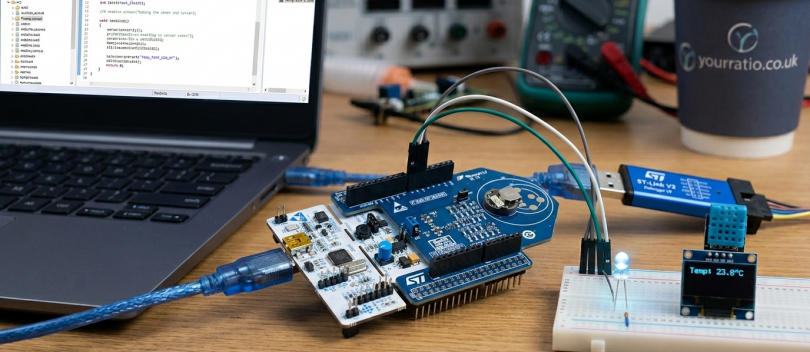
Overview
For many engineers moving into embedded systems, there comes a point where Arduino starts to feel limiting.
It’s useful for getting started. It hides a lot of complexity. You can get something working quickly.
But at some stage, you need more control over how the system behaves. You need better performance, more peripherals, tighter timing, and a clearer understanding of what the hardware is actually doing.
That’s usually when people start looking at the STM32 microcontroller family.
This guide explains what STM32 is, how it works, and how it compares to platforms like Arduino, with enough depth to help you understand where it fits and how to get started.
What is STM32 Microcontroller?
An STM32 microcontroller is a family of 32-bit microcontrollers developed by STMicroelectronics, based on ARM Cortex-M processor cores.
In simple terms, it is a small, self-contained computer on a chip that includes:
- A CPU (processing core)
- Memory (Flash and RAM)
- Peripherals (GPIO, timers, ADC, communication interfaces)
These components are all integrated into a single device, designed to control embedded systems efficiently.
When people ask “what is STM32”, the most useful way to think about it is this:
It’s a platform that gives you direct, structured access to hardware, without hiding how things actually work.
Why STM32 is Widely Used in Embedded Systems
STM32 devices are used across a wide range of industries because they offer a balance between performance, flexibility, and cost.
Key reasons include:
- 32-bit ARM architecture for higher performance compared to 8-bit systems
- A wide range of variants, from low-power to high-performance
- Rich peripheral sets including timers, ADC, DAC, and communication interfaces
- Strong ecosystem of tools and libraries
If you look at technical resources such as STM32 Base or STM32World, you’ll see how widely STM32 is used in real embedded projects.
STM32 for Beginners: Understanding the Architecture
For those approaching STM32 for beginners, it helps to break the system down into its core components.
1. ARM Cortex-M Core
At the centre of every STM32 microcontroller is an ARM Cortex-M processor.
Depending on the series, this could be:
- Cortex-M0 (low power, simpler systems)
- Cortex-M3 / M4 (balanced performance)
- Cortex-M7 (high performance)
The core handles:
- Instruction execution
- Interrupt processing
- Basic system control
2. Memory
STM32 microcontrollers include:
- Flash memory → stores your program
- SRAM → used during execution
Unlike general-purpose systems, memory is fixed and limited, so efficient use is important.
3. Peripherals
This is where STM32 becomes powerful.
Typical peripherals include:
- GPIO (digital input/output)
- ADC (analogue-to-digital conversion)
- Timers (for scheduling and signal generation)
- UART, SPI, I2C (communication interfaces)
- CAN, USB, Ethernet (on more advanced devices)
Each peripheral is controlled through registers, which your code interacts with directly or via libraries.
STM32 Programming: How It Works in Practice
STM32 programming is typically done in C or C++, using development environments provided by STMicroelectronics.
The most common tools include:
- STM32CubeIDE
- HAL (Hardware Abstraction Layer) libraries
- LL (Low-Level) drivers
At a practical level, programming an STM32 involves:
- Configuring peripherals, for example setting up GPIO or timers
- Writing application logic
- Handling interrupts and events
- Flashing the firmware onto the device
Example: Basic GPIO Control
A simple example might involve:
- Configuring a GPIO pin as output
- Writing a value to that pin to turn an LED on or off
Even in this simple case, you are working with:
- Peripheral configuration
- Register-level behaviour
- Timing, if toggling repeatedly
This is why STM32 is often used as a stepping stone from beginner platforms to more advanced embedded systems programming.
STM32 vs Arduino
One of the most common comparisons is STM32 vs Arduino.
While both are used in embedded development, they serve different purposes.
Arduino
- Designed for ease of use
- Abstracts hardware details
- Large ecosystem for beginners
- Slower development of low-level understanding
STM32
- Designed for control and flexibility
- Direct access to hardware
- More complex setup
- Closer to real-world embedded systems
Practical Difference
With Arduino:
- You can get something working quickly
- Much of the hardware complexity is hidden
With STM32:
- You need to understand what the hardware is doing
- You gain more control and better performance
A useful way to think about it:
Arduino helps you start building things.
STM32 helps you understand how those things actually work.
Real-World Use of STM32 Microcontrollers
STM32 microcontrollers are used in a wide range of applications.
Industrial Systems
- Machine control
- Sensor data acquisition
- Automation systems
These systems rely on:
- Deterministic timing
- Reliable operation
Automotive Systems
- Control modules
- Communication systems
- Sensor processing
STM32 devices are often used in systems where timing and reliability are critical.
Consumer Electronics
- Wearables
- Smart home devices
- IoT products
IoT and Edge Devices
STM32 is widely used in IoT because it can:
- Interface with sensors
- Process data locally
- Communicate with external systems
As connected devices continue to grow, platforms like STM32 are becoming more important, which is why they are increasingly discussed in industry publications such as Forbes and TechCrunch.
Getting Started with STM32 for Beginners
If you’re starting out with STM32 for beginners, a practical approach works best.
1. Start with a Development Board
Boards like:
- Nucleo
- Discovery kits
Provide easy access to STM32 hardware.
2. Use STM32CubeIDE
This integrates:
- Code editing
- Debugging
- Peripheral configuration
3. Learn Basic Peripherals
Focus on:
- GPIO
- Timers
- UART communication
4. Understand What the Code is Doing
Avoid relying entirely on generated code.
Spend time understanding:
- How peripherals are configured
- How data flows through the system
5. Build Small Projects
Examples:
- LED control
- Sensor reading
- Serial communication
These build the foundation for more complex systems.
Common Challenges with STM32 Programming
From experience, developers often encounter similar issues when starting with STM32.
Complexity of Setup
Compared to Arduino, the initial setup can feel more involved.
Understanding Generated Code
Tools like CubeMX generate code, but understanding it is essential.
Debugging
Debugging embedded systems requires:
- Hardware tools
- Understanding of system behaviour
Peripheral Configuration
Misconfiguration can lead to:
- Non-working hardware
- Subtle bugs
FAQ: STM32 Microcontroller
What is STM32 used for?
STM32 microcontrollers are used in embedded systems across industries such as automotive, industrial automation, and IoT.
Is STM32 good for beginners?
Yes, but it requires more effort than platforms like Arduino. It provides a deeper understanding of embedded systems.
What language is used for STM32 programming?
Primarily C and C++.
What is the difference between STM32 and Arduino?
Arduino focuses on simplicity, while STM32 provides greater control and performance.
Do I need electronics knowledge?
Basic understanding helps, especially when working with sensors and peripherals.
Final Thoughts
The STM32 microcontroller family sits in a useful position within embedded systems development.
It is powerful enough to be used in real-world applications, but still accessible for those learning how embedded systems actually work.
For engineers looking to move beyond high-level platforms and develop a deeper understanding of hardware and software interaction, STM32 is a natural next step.
Build Embedded Capability
If your teams are working with embedded systems or moving towards hardware-connected development, building capability in platforms like STM32 is essential.
Explore our Embedded Software Engineering courses:
https://yourratio.co.uk/courses/software-engineering/
Or see how modern approaches, including AI, are being introduced into engineering workflows:
https://yourratio.co.uk/ai-capability-learning-path/